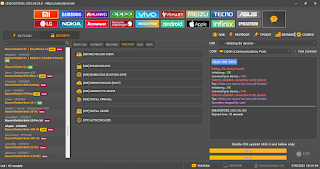
PrimeToolX27.0.2 free
For Community GSM Prime


SAMSUNG
Test mode (*#0*#)
-Remove FRP
-Remove FRP new security
-Factory reset
-Disable Knox
-Disable factory mode
MTP MODE
-Factory reset
-Enable secret code for Verizon
ADB MODE
-Change CSC
-Remove Samsung account (this function only works to remove the account in Settings, it is not compatible with the locked state)
-Enable toggle mobile data (for some AT&T phones)
-Change CSC root mode
DOWNLOAD MODE
-Exit download mode
-Soft brick repair
-FRP Android 5/6 (compatible with some models. If you see an error when trying, it means your device is not compatible)
ODIN FLASH
-Save recent flash files
-Automatic file detection and slot selection
-Automatic extraction for ZIP file
-Ignore MD5 checksum
SEVERAL
-Check the application status of the driver's signature
-Disable/Enable driver signature enforcement
-Install the Samsung USB driver
-Install VC++ 2015 (for ADB jobs)
Xiaomi
ADB
-Skip Micloud Android 8.1
-Enable diagnostics [ROOT]
Quick start
-[UNLOCKED] Remove FRP
SIDE LOAD
-Factory reset
-Remove FRP
-Reset Micloud
-[QUALCOMM] Bypass Micloud Watch (Anti-relock)
-[QUALCOMM] Eliminates Micloud clock bypass (Anti-relock)
-Read Micloud information offline
LG
MTP
-Factory reset
-EDL (compatible with LG G7, G8, G8X, G8S, V30, V40, V50, V50S, Q6, G5, G6, V20, V35, V60)
-Factory reset
-Remove FRP
LG UP
-LG KDZ Flash
Android
-ADB
-Battery information
-Disable/Enable OTA update
-Choose language
-Factory reset
-Hide developer options
FRP
-Open Browser (FRP)
-Remove FRP
-Application control
-Manage applications, delete, disable, enable, clear data for single applications, multiple applications
-Install APK/xAPK
-Install any app on Dual Messenger
ROOT
-Remove screen lock (Root)


Comments
Post a Comment