MultiUnlockMDM v1.0.0.1
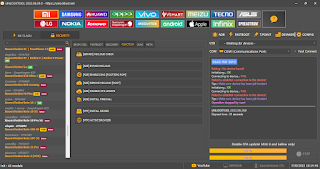
MultiUnlockMDM v1.0.0.1 is a Windows tool with different modules for mobile device management (MDM), ADB operations, Samsung KG functions, and other device-related tasks.This version includes modules for Universal, Xiaomi, Samsung, Motorola, OPPO, Google Pixel, and Apple A12–A13 RAMDISK operations.It also includes an ADB Manager, additional device functions, and several updates listed in the changelog.The tool requires installation and account activation before use.The release notes include updates from September 2026.


Universal ADB Features:
Check ADB
Activate ADB QR
MultiUnlockAPP
IT Admin All Devices
Payjoy Zero Trace
Payjoy New App
Candado Telcel/Claro
Claro/Telcel New APP
MDM Kiosko
Kiosko Universal New Security
FRP / Finish Setup
Claro/Telcel Old Security
ADB Manager:
System Packages Filter
User Packages Filter
Enabled Packages Filter
Disabled Packages Filter
Uninstall Packages Filter
Deshabilitar (Disable)
Desinstalar (Uninstall)
Instalar (Install)
Habilitar (Enable)
Suspender (Susapend)
Activar (Activate)
Detener (Stop / Force Close)
Borrar Cache (Clear Cache)
Borrar Datos (Clear Data)
Mitigar (Mitigate)
Guardar (Save)
Xiaomi:
Disable Mi Account Zero Trace
Claro/Telcel Xiaomi Zero Trace
Kiosko Xiaomi
Disable OTA Update Xiaomi
Mi Account (Root)
Kiosko Zappah!
Samsung:
AT Command Console
KG Active Permanente (No ADB: Android 14, 15 and 16)
Activate ADB Security Patch 2022–2023
Disable OTA Update Samsung
QR Fix Play Protect KG Bypass
FIX KG Bypass
Activate ADB QR
Activate ADB New APK
KG ROOT New
Claro/Telcel Root
Disabled Leyenda (KG Bypass)
(ADB) KG Bypass 2024–2025
KG Android 14 All Security
KG Active 01
Disable Knox KG Root
New KG Magisk
Fake IMEI Root
Enable ADB Android 16 New
Erase FRP Android 16
TELTRI:
Security Plugin Method 1 Server
Motorola:
Disable OTA Update Moto
White Screen Moto Kiosko
Claro/Telcel Root
Disabled OTA Root
Kiosko (PAKS) Root
OPPO:
White Screen OPPO
White Screen OPPO New Security 2
Disable OTA Update OPPO
Google Pixel:
SIMLock Google Pixel
Apple A12–A13 RAMDISK Bypass Module:
Boot Devices
Reboot Devices
Backup Passcode
Restore Backup
Disable OTA
Erase Devices
Erase Devices V2
Mount SSH
Mount SSH V2
FIX Recovery Mode
Registrar Serial A12-
What's New (Changelog):
Added KG Active Permanente bypass without ADB for Android 14, 15 and 16, with Security Patch 01-01-2026.
Added Samsung Fake IMEI Change; Root and Vector are required.
Fixed the Apple A12–A13 RAMDISK boot error.
Updated the module interface and fixed GUI bugs.
Added Activate ADB QR for Universal and Samsung.
Added IT Admin All Devices for all security versions; marked stable and not beta.
Added ADB Manager, a full ADB administration panel for VIP accounts.
Added differentiation between VIP and GOLD accounts.
Added AT Command Console.
Added ADB Security for 2022–2023 using *#0*#.
Added FIX KG Bypass to complement KG Android 14 All Security.
Added Activate ADB New APK for Samsung through MultiUnlockMDM.apk.
Added experimental KG ROOT New.
Added Claro/Telcel Root for Samsung to remove co.sitic.pp using Root.
Added Disabled Leyenda (KG Bypass) to remove the notice or watermark after bypass.
Added ADB KG Bypass for 2024–2025; KG Active or Broken is required.
Completed KG Android 14 All Security for KG bypass on Android 14 across security patches.
Added KG Active 01 to change Locked status to Active 01 through ADB.
Fixed Security Plugin Method 1 Server to help prevent relocking.
Added AssetLockMDM v2.0.
Added Claro/Telcel Root for Motorola to remove co.sitic.pp using Root.
Added Disabled OTA Root for Motorola.
Added Kiosko PAKS Root for Motorola kiosk or white-screen cases associated with PAKS.
Added Disable OTA Update for OPPO.
Updated the Apple A12–A13 RAMDISK module with Bypass Passcode Signal and Factory Reset RAMDISK.
Updated logs to Build 0.6.7.
Added HWID reset up to 7 times every 24 hours for VIP accounts.
Added Auto-Update.
Moved ADB tasks to background processing to help prevent the GUI from freezing.
Added internal anti-audit and anti-analysis protection.
Added Remote ADB mirror functionality to view and control Android devices through ADB without using the touchscreen.
How to Install MultiUnlockMDM v1.0.0.1:
Download the MultiUnlockMDM archive using one of the download links below.
Extract MULTIUNLOCKTOOL_GSMYOGESH.rar using an archive utility.
Open the extracted folder and locate Setup_MultiUnlockMDM-1.0.0.1.rar.
Extract the setup archive. The archive password is MDM.
Find MultiUnlockMDM-Setup-1.0.0.1.exe and start the installer.
Follow the setup instructions to complete the installation. If the installer asks for a separate password, use only the password provided by the software distributor; it is not confirmed here.
After installation, locate MUM_LOAD.zip if it is included in your package.
The password provided for MUM_LOAD.zip is gsmyogesh.com.
Extract the loader and locate MUM_LOAD.exe. Before running an unfamiliar loader, scan the files with your security software and verify that you trust the source. Do not disable Windows protection just to run an unknown file.
Open the program and follow its activation instructions.
How to Activate and Use the Tool:
Launch MultiUnlockMDM after installation.
Follow the program's instructions to obtain your HWID.
The activation process described for this tool uses a 10-day free activation key generated through its activation portal. The portal URL was not provided, so use the official address supplied by the developer.
Enter the activation key and complete the license registration process.
Accept the terms by clicking Aceptar y Continuar, when displayed.
Enter your username and password.
Click Ingresar al Sistema to open the main interface.
Review and accept the update notes if prompted.
Connect your device using a suitable USB cable and select the relevant module for your device and intended operation.
Follow the on-screen instructions for the selected function. Available options may depend on the account type, device, Android version and security patch.
Download MultiUnlockMDM v1.0.0.1
Setup Password is MDM.
Password for MUM_LOAD.zip is gsmyogesh.com.
For safety, scan downloaded archives and executable files before opening them. Download and use the software at your own discretion.
Credits: SoftwareCrackGurú and gsmyogesh


Comments
Post a Comment