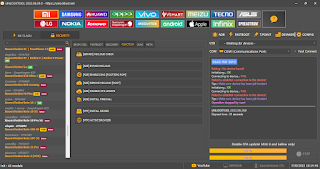
MRST UniSoc Tool v1.0 No need dongle
What Makes MRST UniSoc Tool Special?
No Dongle Required – You don’t need any hardware to activate the tool.
No Login or Keygen – Just enter any username and password, and it works instantly.
Supports Popular CPUs – Including SC7731E, SC9832E, SC9863A, Tiger T606, T612, T616, T700, and more.
User-Friendly Interface – Clean layout, easy buttons, and fast performance.
Powerful Functions:
Remove FRP (Factory Reset Protection)
Reset User Data
Unlock Bootloader / Relock Bootloader
Read & Write RPMB
SIM Unlock for all carriers
Backup, Restore, and Erase Partitions
Flash firmware with custom address range

How to Install MRST UniSoc Tool v1.0
Download the .rar file and extract it to your desktop
Use the password: softwarecrackguru
Open the extracted folder and run MRST_Loader_UniSoc.exe as Administrator
Click OK on the splash screen
Enter any username and password in the login window
Click Login and then OK on the popup
Done! The tool opens successfully—no dongle, no login, no activation needed
Download Link:


Comments
Post a Comment